
Article Summary: Payroll errors don’t start in payroll — data errors start when HR, timekeeping, and payroll systems don’t match. One missed update can turn into wrong pay and taxes, or missed deductions. This article highlights the most common payroll errors, and how to fix and prevent them. HR data connectors sync your data automatically, so payroll runs smoothly.
Payroll Errors Key Takeaways
- Payroll errors are the data glitches that turn payday into a detective story, where you’re chasing clues across systems to explain mismatched numbers.
- Payroll is where data becomes a paycheck. Payroll errors are most often caused by manual data entry and disconnected HR, timekeeping, and payroll systems.
- Nearly 32% of employees find errors in their paychecks, and 17% report stress related to payroll inaccuracy.
- Common payroll errors include misclassified employees, incorrect tax withholding, and missed deductions.
- Unchecked payroll errors can trigger compliance violations, legal risks, financial penalties, and a serious drop in employee trust.
- Preventing payroll errors requires automation, system integration, and a clean data flow between HR, time-keeping, payroll, and finance apps.
- Data integration ends most payroll errors by eliminating manual re-entry, syncing updates, and flagging issues before they hit payroll.
Want to know the full story? Read on.
What Are Payroll Errors?
Payroll errors are the data glitches that turn payday into a detective story, where you’re chasing clues across systems to explain mismatched numbers. Sometimes the errors are obvious, like a missing overtime payment. Other times, they hide in the details, like taxes withheld for the wrong location, or missing bank data that derails direct deposit. Either way, it lands the same. Your team has to explain it, fix it, and make sure it doesn’t happen again.
The frustrating part is how normal these payroll errors begin: pay rate updates, transfers, or benefits changes. When updates don’t sync cleanly from HR and timekeeping into payroll, your systems drift out of alignment — and the proof is in the paycheck. Small payroll missteps can quickly result in compliance headaches, penalties, and frustrated employees.
Introduction
Payroll is where data becomes a paycheck. Even small process gaps feel big, fast. Employees don’t experience data issues; they experience rent due on Friday and a net pay that’s alarmingly lacking. People can ignore a clunky process, but they don’t ignore a shorted paycheck.
Research reported by HR Executive found that nearly 32% of employees find errors in their paychecks, and 17% report stress related to payroll inaccuracy. If that’s what employees are seeing, how many of your payroll problems are really manual data entry problems that started upstream?
If you run payroll every two weeks, that’s 26 chances a year for data to drift, approvals to slip, or a “small” mismatch between systems to turn into an employee issue.
Asking How do we fix payroll errors? is valid, but the deeper question is How do we stop feeding them into payroll in the first place?
Common Types of Payroll Errors
Payroll errors tend to repeat. Not because your team isn’t careful, but because the same data breaks in the same places.
Incorrect Employee Classification
Classification mistakes often start outside payroll. Someone gets set up as a contractor when they should be an employee. Or a role changes, but the exempt/nonexempt status is never revisited. Payroll then processes what’s on file. You end up fixing pay, overtime eligibility, and potentially a compliance mess, all because one record didn’t travel.
Incorrect Tax Withholding and Filing
Most tax errors come from messy inputs, not a broken payroll engine. Think work location, state and local tax rules, employees who move, transfer, or switch between remote and onsite work. If the HR record doesn’t stay current, withholding won’t either.
And once a tax problem appears, it tends to spread: forms, filings, adjustments, and lots of people asking why did this happen?
Wage and Overtime Calculation Errors
Errors get blamed on payroll, but the root cause usually lives in time and attendance. Most often, these are missing punches, wrong time codes, and overtime rules applied differently across locations. Research shows that time and attendance errors are common, occurring on average more than once per employee per year. Those errors cost about $250,000 per 1,000 employees.
If time data arrives incomplete or inconsistent, payroll can’t “math” its way out of it.
Data Entry and Record Errors
Manual and duplicate entries are the culprits here. A single pay rate update is keyed in HR, but never makes it to payroll. Then the problems start to stack up. The employee’s banking data change gets saved in one system, but not the other. A department transfer updates in one place, but payroll still runs the old record.
If your workflow still includes spreadsheets, emailed change requests, or manual uploads, you’re basically inviting records to drift. Your data alignment just crashed, and payroll is where the lights flash and sirens blare.
Missed Deductions and Benefits Errors
Benefits and deduction issues usually slip through the cracks because your systems don’t agree on what’s current, not because someone missed a step. A life event changes a benefits election, but the updated deduction never makes it to payroll. PTO balances don’t match between timekeeping and payroll, leading to incorrect payouts.
These errors don’t make a scene right away. They build up quietly, cycle after cycle, until an employee flags something. Now you’re backtracking through disconnected systems to find out where the signal dropped. When updates rely on emails, spreadsheets, or someone remembering to send a file, even the most basic deduction becomes a cleanup project.
Late or Missed Payroll Payments
Late pay is one of the fastest ways to lose employee trust. One missed check can seriously shake employee confidence. And if you’re operating in states with strict pay frequency rules, it’s also a compliance issue waiting to happen.
These issues often trace to a timing breakdown: a delayed file, an approval that didn’t make the cutoff, or a last-minute adjustment that derails your run. When payroll depends on manual steps and handoffs, you’re one missed input away from a late payment and a lot of explaining.
Why Payroll Errors Happen
Payroll errors aren’t random. They show up in the same places for the same reasons.
- Manual processes introduce human error, delays, and double data entry.
- Disconnected systems force you to sync records manually — if you remember to.
- Regulatory complexity makes even small mistakes risky and expensive.
- Communication gaps between HR, timekeeping, and payroll leave updates stuck in limbo.
When your payroll run depends on the hope that every change was caught, keyed, and synced manually, you’re not managing a process. You’re managing risk.
Flexspring sees this every day. Our data integration experts talk to teams stuck fixing issues that were totally avoidable by replacing manual data entry tasks with data connectors and automation.
A busy nonprofit resolved recurring payroll errors by replacing spreadsheet handoffs with data integration connectors that automatically synced payroll data into their ERP, such as Odoo. Errors dropped, reporting improved, and payroll and finance teams got hours back each cycle.
"Data no longer sits idle waiting for me to manually transfer it to accounting. Now they have the data as soon as I'm done with payroll because the integration sends it right away. We save more than an entire day’s worth of work for each payroll cycle!" — Deborah Giron, HR and Payroll Manager, Housing Assistance Council
Consequences of Payroll Errors
The impact of payroll errors spreads far beyond one paycheck.
- Financial penalties hit fast — especially for missed or late tax deposits.
- Compliance violations can trigger audits, wage claims, and legal exposure.
- Retroactive fixes eat time and strain teams already stretched thin.
- Employee frustration erodes trust and increases turnover.
A single mistake might be manageable. Repeated issues become patterns, and patterns are what get flagged in audits, reviews, and exit interviews.
How to Fix Payroll Errors
It’s one thing to fix payroll errors, but the smarter step is to stop them from happening again.
Step one is reactive. Contain the issue. Confirm how widespread it is. Avoid changing multiple variables at once. Communicate clearly with employees about timing and next steps.
Step two is proactive. Find and fix the cause. Most often, the root cause of payroll errors is broken data flow between HR, timekeeping, benefits, payroll, and finance systems.
Flexspring’s data connectors help teams close those gaps by connecting HR, timekeeping, and payroll systems so changes flow automatically. Whether it’s a pay rate, a tax location, or a deduction, updates made in one system reflect everywhere they need to, in near-real time.
How to Prevent Payroll Errors
Preventing payroll errors involves reducing the chances for things to go wrong in the first place.
The fewer manual steps you have, the fewer mismatches you’ll find. Data integration turns that into a repeatable process, one that doesn’t depend on someone remembering to rekey data or email a file.
“Before the integration, a rogue manager could go into the system and create an employee that doesn’t exist: a ghost employee. They would create a fake new employee and have the direct deposit go to their bank account. They would clock in and out as that ghost employee while working and then collect pay for that employee who doesn’t exist. Now, with the integration, if a rogue manager creates a fake new employee through Aloha, the employee ID generated through ADP won’t match the employee created in Aloha. When the files get uploaded to ADP through Flexspring, the bad records are rejected because that’s a non-existent employee. Integration helped us tremendously by increasing security.” — Rob Pham, Vice President of Information Technology, Wen JAI Restaurant Group
Automate with Reliable Payroll Software
Payroll software does the math, but without clean data flowing into it, even the best software can’t produce accurate results. Data integration is the fix.
With Flexspring, you can automate the flow of employee data, job changes, time records, deductions, and more between your HRIS, timekeeping, and payroll systems. Our prebuilt connectors for ADP, Paychex, NetSuite, and other platforms sync data in near real-time. No more spreadsheets or file uploads.
When updates made in HR flow directly into payroll, you don’t have to cross your fingers at every run.
Sync Data for Automated Verification
Manual reviews are inconsistent and time-consuming. Data integration replaces last-minute spot checks with early, automated verification. When data stays in sync, you catch problems before they hit payroll.
The following are the most popular payroll system integration use cases that free HR and payroll teams from time-consuming, manual double-data entry.
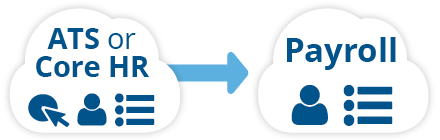
1. New Hires from Your ATS or Core HR to Your Payroll App. When a hiring manager presses the new hire button in your ATS or Core HR, new hire data automatically syncs in payroll in near real-time with the essential information needed to process payroll. The data duplicates instantly!
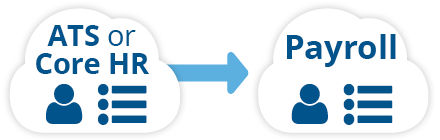
2. Employee Updates from Your ATS or Core HR to Your Payroll App. When combined with employee updates, as soon as current employee data changes in your ATS or Core HR, employee data automatically refreshes in payroll in near real-time.
“Before this Greenhouse to ADP integration, we had data-entry user errors, so we needed automation to eliminate these manual tasks. Now, when we hit that hire button in Greenhouse, a record is created in ADP, kickstarting our onboarding process. Also, when we update employee information, that automatically syncs as well. Integration allows us to focus on recruiting because every minute we spent doing manual tasks took time away from finding the best new employees.” - Brandon Jackson, Technical Recruiting Manager, B-Stock Solutions
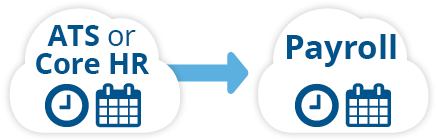
3. Time and Attendance from Your Time Tracking App to Your Payroll System. Time and attendance from your time tracking app to your payroll acts like a magical conveyor belt, moving clock-in and clock-out data automatically, sparing HR professionals the tedious task of manually inputting timesheets and ensuring accurate records of hours worked. This use case also manages vacation and leave time.
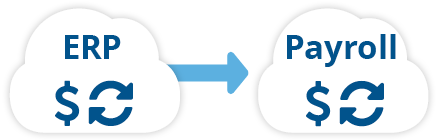
4. Expense Reimbursement from an ERP to Payroll. The expense reimbursement from an ERP to payroll integration takes all approved expense reimbursements from your ERP beyond regular compensations— for example, travel deductions, mileage, or cell phone—and imports the expense data into payroll’s pay data batch module.
For more information on additional use cases, check out our Ultimate Guide to Payroll Integration whitepaper:
Stay Current on Laws and Regulations
Rules change constantly. If your systems don’t update together, you end up relying on manual workarounds that only patch the problem temporarily.
Data integration reduces the number of places you need to update. When you update the system of record and push that change through connected platforms, you reduce the risk of HR having one version of reality and payroll having another.
When compliance is built into your data flow, you stop chasing problems after the fact.
If you can identify where data gets entered twice, or where someone has to remember to send a file, you’ve found the problem — data integration solves it.
Frequently Asked Questions
- What causes payroll errors? Most payroll errors come from manual steps, system silos, or updates that don’t automatically flow between your ATS, HCM, timekeeping, and payroll.
- What is one of the most common payroll errors? Time and attendance issues — like missed punches or incorrect codes — are among the top drivers of pay discrepancies.
- How costly are payroll mistakes? Industry research shows payroll errors cost an average of $291 per incident, not including penalties, rework, or lost trust.
- Can payroll software prevent errors on its own? Payroll software handles the calculations. Data integration ensures that the data it runs on is complete, correct, and current across all systems automatically.
- Can data integration help with compliance and reporting? Yes. Integrated payroll and HR systems reduce the risk of compliance issues by keeping data aligned and up to date with HR records and tax rules. That means fewer manual adjustments and clearer audit trails when you need to show accuracy.
- How does automated payroll syncing help accuracy? Automated syncing pulls payroll data like hours, earnings, taxes, and deductions from your payroll system into your accounting or HR systems without manual entry. That cuts out common points where typos and omissions happen.
- Can data integration catch errors before they become a problem? Yes. Some integrations include balance checks (e.g., debits vs credits) and notifications if something looks off, so you can catch discrepancies early rather than after payroll runs are posted.
- What happens when employee data changes, such as a new hire or pay rate? With data connectors in place, those changes flow automatically to your payroll and accounting systems in near real‑time, so your payroll calculations and records stay aligned without manual updates.
- Do I need an IT team to connect my HR and payroll systems? Many connectors are designed to work without internal IT resources, and integration experts can handle mapping and setup so HR and finance teams don’t have to build or maintain complex connections themselves.
- Do payroll integrations really reduce workload for HR and accounting? They do. By eliminating repetitive tasks like new hire entry or employee updates, teams save hours and often entire days each pay cycle that would otherwise go to manual data handling.
Conclusion
Payroll errors aren’t random. They follow predictable weak points: manual steps, disconnected systems, and changes that don’t propagate. If you want fewer payroll errors, you need fewer opportunities for data to drift. That means building a process that doesn’t depend on spreadsheets, exports, and last-minute fixes.
Flexspring’s data connectors keep your ATS, HCM, timekeeping, and payroll systems in sync. Updates flow automatically, and the risk of mismatch drops with every integration. Because once your systems drift, errors hit paychecks.